Dead Quiet · Master Rack

Our mastering room.
On your desktop.

Drop a premaster into DQ Master Rack and it masters instantly, to the DQ Signature, our own studio's chain. Every control responds live. Hear the finished master before you pay anything.
macOS · Apple Silicon & Intel · Free to download · From £5.99 to export
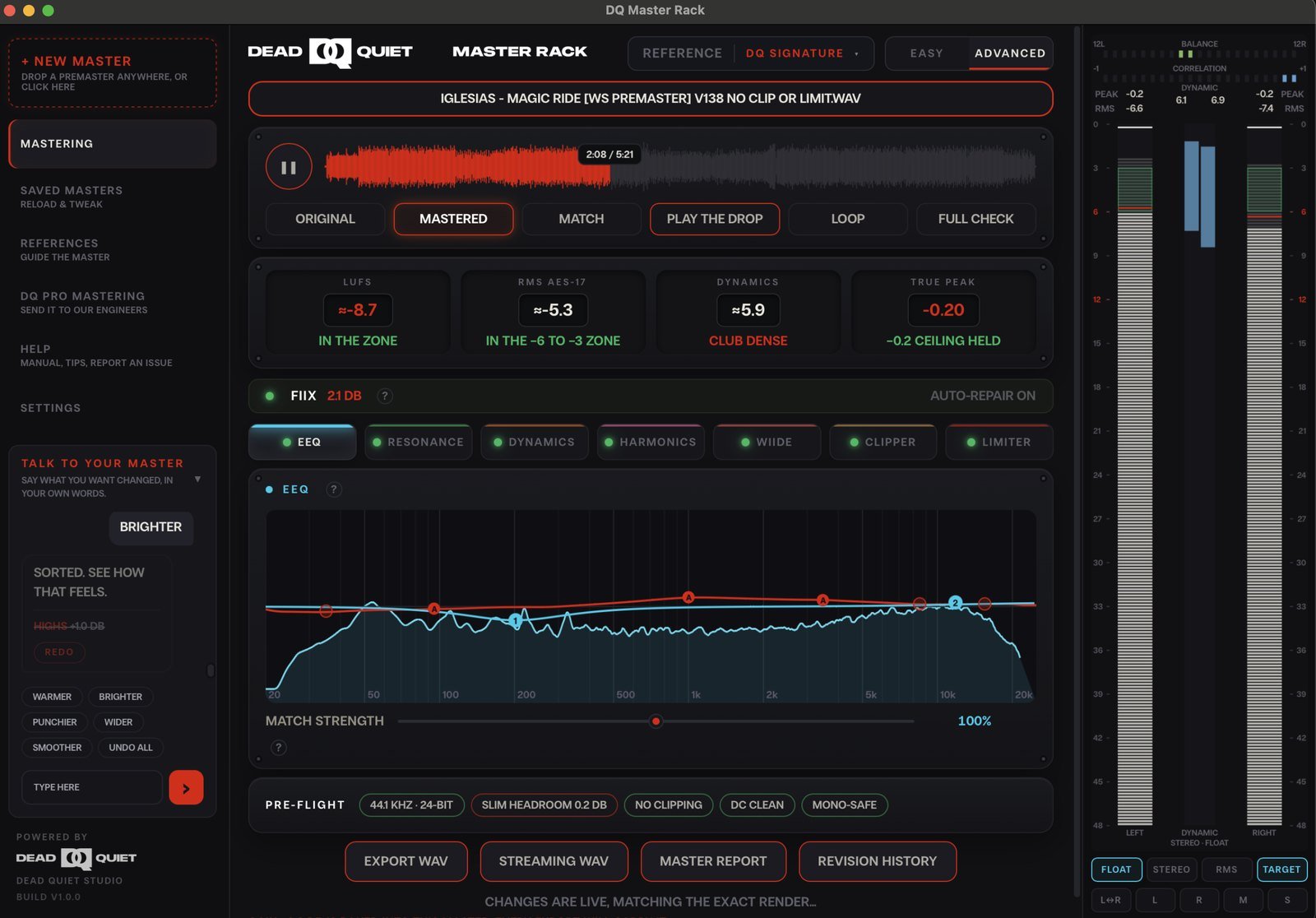
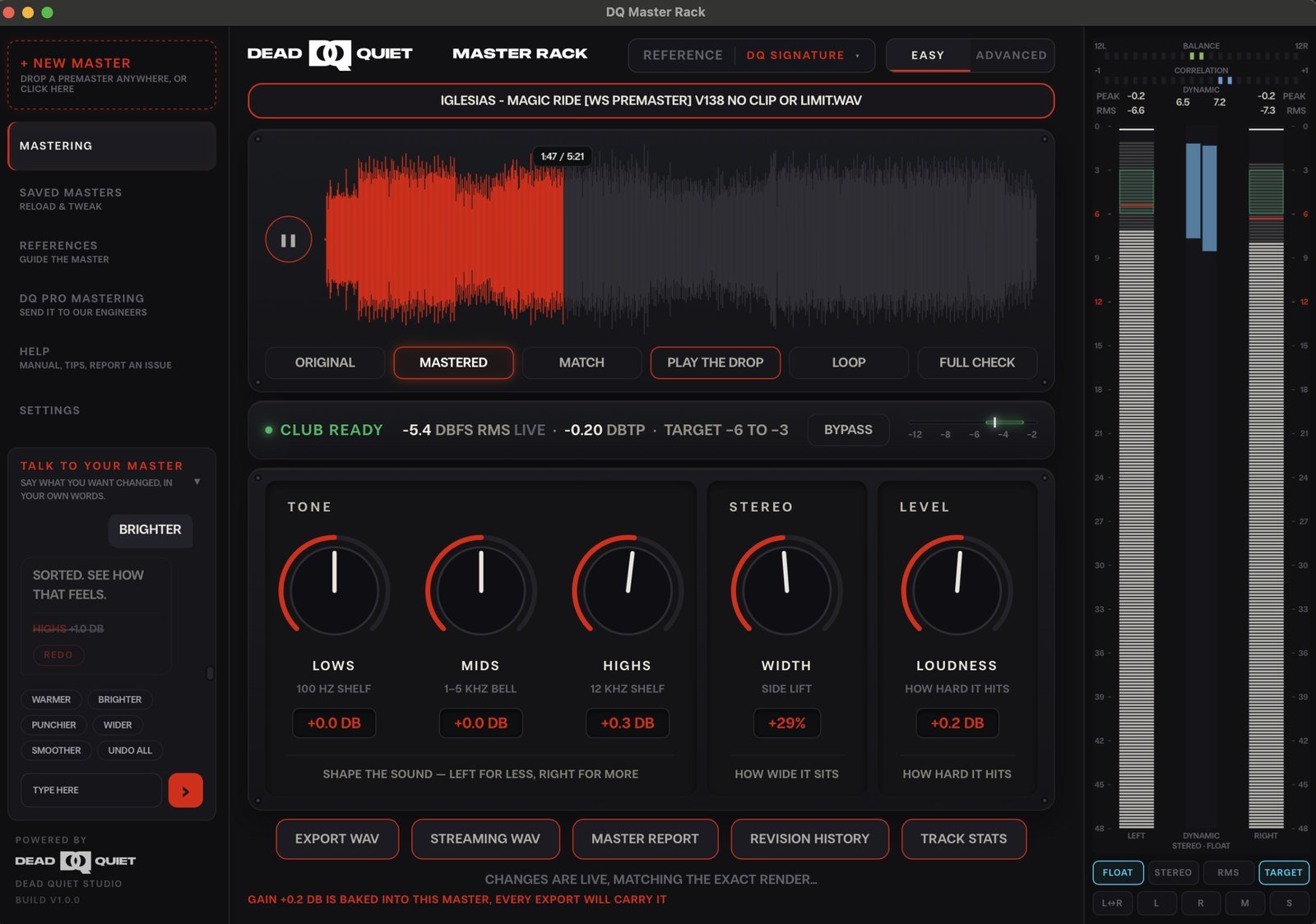
DQ Master Rack advanced rackDQ Master Rack easy mode

Free to download.
Free to master.

You only pay to export. Hear the finished master first, every time.

£5.99
One master
£24.99
10 a month
£39.99
25 a month
£49.99
50 a month
Download free

More than an algorithm

Not another
upload-and-pray master.

01

Hear it before
you pay

The full, real master, free. The paywall is the export, never the sound.

02

Talk to
your master

Tell it “warmer”, “more air” or “punchier”. Speak naturally in any of 10 languages, and the engine turns your words into mastering moves.

03

A real studio's
sound

The DQ Signature is our own chain: the one we master client records on, not a model trained on the internet.

04

It never leaves
your machine

Renders locally. Your audio is never uploaded, and it never trains anyone else's model.


Hear it

Same track.
Four masters.

One premaster, mastered four ways: ours, and three of the services people usually reach for. Nothing here is normalised. Every file plays back at the level it was returned at, so you hear exactly what each one hands you. Switch between them while it plays.

Pick a style

Loading audio…
0:00 / 0:30
Switch masters while it plays. Everything stays in sync, so you hear the same bar four ways.
These records were officially mastered in our studio through a 100% analogue mastering chain. For this comparison we’ve taken the same premaster and run it through the DQ Master Rack app — so what you’re hearing here is the app’s master.

Measured in your browser from the clips playing on the Listen tab

Frequency balance · averaged across the clip, at the levels they came back at

MeasurementDead QuietABC

Integrated loudness measured to ITU-R BS.1770-4 with gating, taken from the exact files playing above.

Nothing is normalised

Each file plays at the level the service returned it at. The gap is the point: the quieter ones are quieter because that is what came back. Streaming will pull all of this to the same loudness later, so listen past the volume to the low end and the width.

Look at the low end

The frequency chart is where the real differences show. Watch below 100 Hz: cloud services tend to thin the bottom to stay safe on every system, and the low end percentage in the table tells you by how much.

Watch the stereo correlation

This is how much of the stereo image survives being folded to mono. Around 1 is mono-safe. A master that drops below zero has width that will partly cancel on a club sub or a phone speaker.

All four versions come from the same premaster, exported at the same sample rate, and trimmed to the same thirty seconds. The three comparison services are not named. They are the best known AI mastering service, a dedicated online mastering engine, and the mastering built into a major streaming platform. Measurements are taken in your browser from the exact files being played, so you can check them yourself. Loudness follows ITU-R BS.1770-4. Files are delivered as MP3 for the web, which changes peak levels slightly and is why peak is not reported here.

Hear it on your own track.

Download freeFree to download and master

Inside the app

A whole studio, one window.

Five controls to a finished master.

Drop a premaster and it's already club-ready. Nudge lows, mids, highs, width and loudness. The engine does the rest.

Auto club-readyLive A/B

EEQ.

Modelled on the EQs sitting on our own desk, with tube-driven saturation and a transformer output stage. A boost here adds weight and colour, not just level, which is the part a clean digital EQ never gives you.

Shape the curve by hand on the live analyser, or hand it a reference and let it match band by band.

Tube saturationTransformer outputLive analyserReference match

WIIDE.

Width applied band by band instead of across the whole mix. Open the top end right out, hold the low end tight and mono-safe, and set exactly where the two meet.

Phase stays intact the whole way down, so the record that sounds huge on a club system is the same record that still holds together on a phone speaker or a mono club sub.

Per-band widthMono-safe lowsPhase-safeClub to phone

Our signature limiter.

Not an off-the-shelf brickwall. This is the limiter we tuned to the settings we reach for day in, day out, so the moves we would otherwise make by hand are already sitting in it.

HPF limiting leaves your low end alone and limits only the mids and highs. Your bottom keeps its weight and its power instead of being dragged down every time the kick lands.

Mid/side limiting holds the centre steady while the sides stay open, so it gets loud without collapsing inwards. True-peak ceiling held at −0.2 dBTP, last thing in the chain: loud enough for a club, clean enough that no streaming platform turns it down.

HPF limitingMid/side limiting−0.2 dBTP ceilingClub loud

One-click export.

A 24-bit master plus a loudness-normalised streaming twin, spec-perfect for every platform.

24-bit masterStreaming twin
The signal path

Every module, in the order your audio actually hits it. This is the DQ Signature chain, and all of it is in the free download.

Click any module in the chain

Running across the whole chain

Analogue, automatic

The colour of the desk, applied at the level the track actually needs rather than the same dose every time.

Reference bank

Feed in your own previous masters and the engine learns your house sound, so every release lands the same.

True preview

What you are listening to is the render. Not an approximation, the same file you would export.

Live metering

LUFS, RMS and true-peak live on the rack the whole time, so you always know where you sit against target.


Talk to it

Talk to your master.

Type what you want changed, in your own words. The engine hears you and moves.

Real screen recording, not a mockup

Ten languages.
Zero parameters.

Producers have always talked to their engineer this way: “a touch warmer,” “more punch,” “back the highs off.” Master Rack listens the same way. No parameter to hunt for, no menu to learn. Just say it, in your own words, in any of ten languages.

Every move shows on the rack in real time, so you see exactly what changed and why. It's still the DQ Signature chain doing the work. Natural language just replaces the mouse.

10 languagesLive on the rackNo parameters to learn
What people actually type
WarmerBrighterPunchierWiderSmoother

How it compares

Not all mastering
is the same.

Dead QuietMaster Rack LANDRWavesSoundCloud
Hear the finished master, freeFull quality, no watermarkPreview onlyPreview onlyPro accounts only
Talk to it in plain words"Warmer, more air", 10 languagesNot offeredNot offeredNot offered
One real studio's soundThe DQ Signature chainGeneric algorithmGeneric algorithmGeneric algorithm
Your audio never leaves your machineRenders 100% locallyUploads to the cloudUploads to the cloudUploads to the cloud
Full advanced chain + true-peak meteringEQ, dynamics, harmonics, limiterLimitedLimitedNone
Build your own reference soundReference bank, unique to youNot offeredNot offeredNot offered
Pay as you goFrom £5.99 a master, with monthly subscription optionsSubscription-ledPer-track creditsSubscription only

Dead Quiet Master Rack

Free, full-quality hear before you pay
Plain-English control, 10 languages
Real studio chain
100% local, never uploaded
Full advanced chain + metering
Reference, your own sound
From £5.99 a master

LANDR / Waves / SoundCloud

Preview only before paying
No plain-English control
Generic algorithm
Uploads your audio to the cloud
Limited or no advanced chain
No reference sound
Subscription-led pricing
Comparison based on each product's publicly listed features · Aug 2026

For artists & labels

Built for artists.
Made for labels.

Anyone can master in Easy mode. A label can run a whole roster through it, no engineering.

01

Run the premaster in

Drop the artist's mix into Easy mode.

02

Send it to the artist

Bounce the master and send it for their ears.

03

Feedback into the chat

Type their notes in plain words, no dials.

04

Sign it with your sound

Build a reference bank, for your unique sound.

The Reference bank

Your own label sound, built in.

Feed in a bank of your previous masters and the engine learns your house sound, so every release on your label lands with the same signature, automatically.


Pricing

Free to hear.
Pay to export.

One credit covers a whole track. Your first export spends it — then re-render, tweak and re-export that same track as many times as you like, free. A new credit is only used when you upload a new track.


1 Credit

£5.99
Master one track, pay as you go.
  • One release-ready export
  • Streaming twin included
  • No subscription
Buy a credit
Most popular

10 Masters

£24.99 /mo
For artists shipping every month.
  • 10 exports a month
  • Streaming twins
  • Reference matching
  • Cancel anytime
Subscribe
More masters

25 Masters

£39.99 /mo
For heavier release schedules.
  • 25 exports a month
  • Streaming twins
  • Reference matching
  • Master report & revision history
Subscribe
Best value

50 Masters

£49.99 /mo
Master a whole roster.
  • 50 exports a month
  • Streaming twins
  • Reference matching
  • Master report & revision history
Subscribe
Download free · create an account · your credits are waiting on your dashboard

Good to know

The essentials.

What do I need to run it?
A Mac. Download free, create a deadquiet.studio account, and you're mastering in a couple of minutes.
Does my music ever leave my machine?
No. Every master renders on your own Mac. The premaster and the finished master are never uploaded. The only things that touch the internet are your licence check and fetching the DQ Signature profile. No audio, ever, and none of it trains anyone else's model.
What can I master?
Any premaster you'd otherwise send to a mastering engineer. (exact input formats, pending confirmation)
How does exporting work?
One credit covers a whole track. The first export spends it, then you can re-render, tweak and re-export that same track as many times as you want, completely free. You only use another credit when you upload a new track (or a new version of it). Monthly credits reset each month and don’t roll over.
Do I have to subscribe?
No. Pay £5.99 a master when you need one, or take a monthly plan for regular releases. Cancel anytime.
Dead Quiet

Bring us
the record.

Download free. Master in seconds.

Download DQ Master Rack (free)
System requirements

One download. Every Mac.

DQ Master Rack runs entirely on your own Mac — nothing is ever uploaded. The free download includes both builds — Apple Silicon and Intel — so it works on any Mac. Inside, just open the installer that matches your chip; it’s the same app either way, with the same features and the same DQ Signature sound.

Apple Silicon
macOS 12 (Monterey) or later
Any Mac with an Apple M1, M2, M3 or M4 chip — every Mac from late 2020 onward.
Intel
macOS 10.15 (Catalina) or later
Older Intel-based Macs.
Not sure which you have? Open the Apple menu → About This Mac. If it shows Chip: Apple M… run the Apple Silicon installer; if it shows Processor: Intel run the Intel installer.